Monte Carlo
The Monte Carlo method is a statistical technique that involves running multiple simulations with randomly sampled input parameters to estimate the distribution of the output variables.
In Africa, navigating decision-making amidst rapid demand growth and substantial infrastructure changes poses a significant challenge. To tackle this uncertainty, the Monte Carlo method can be employed to construct a stochastic interpretation of deterministic model scenarios. This approach enhances the ability to account for variability and assess potential outcomes, providing a more robust foundation for informed decision-making.
To use the Monte-Carlo method in PyPSA-Earth, you have to activate the
monte_carlo option in the configuration file (config.yaml),
set add_to_snakefile to true in the monte_carlo section. This will
enable the monte-carlo method.
There are a few additional options that needs to be set in the monte_carlo configuration options.
Set options
samples: The number of samples to be used in the monte-carlo simulation.sampling_strategy: The method used to sample the input parameters. Either ofpydoe2,chaospy, orscipy.seed: The seed for the random number generator. It is useful to set the seed to a fixed value to ensure reproducibility of the results.
Set uncertainties
The uncertainties section in the configuration file is used to specify the
parameters to be sampled in the monte-carlo simulation. The uncertainties
section is a dictionary with the keys being the pypsa object value to be
sampled and the values split into type and args of which type is used to
select the distribution and args used to specify the parameters of the selected
distribution type.
The following is an example of the uncertainties section in the configuration file:
uncertainties:
  loads_t.p_set:
    type: uniform
    args: [0, 1]
  generators_t.p_max_pu.loc[:, n.generators.carrier == "onwind"]:
    type: lognormal
    args: [1.5]
  generators_t.p_max_pu.loc[:, n.generators.carrier == "solar"]:
    type: beta
    args: [0.5, 2]
Note: To understand the different distribution types and their parameters, check the Scipy Documentation.
Tip: To create realistic uncertainties, it is important to pay attention to the distribution that is being applied to each
pypsa object parameter.
Workflow
To perform a dry-run of the monte-carlo simulation after setting the config options, use the following command:
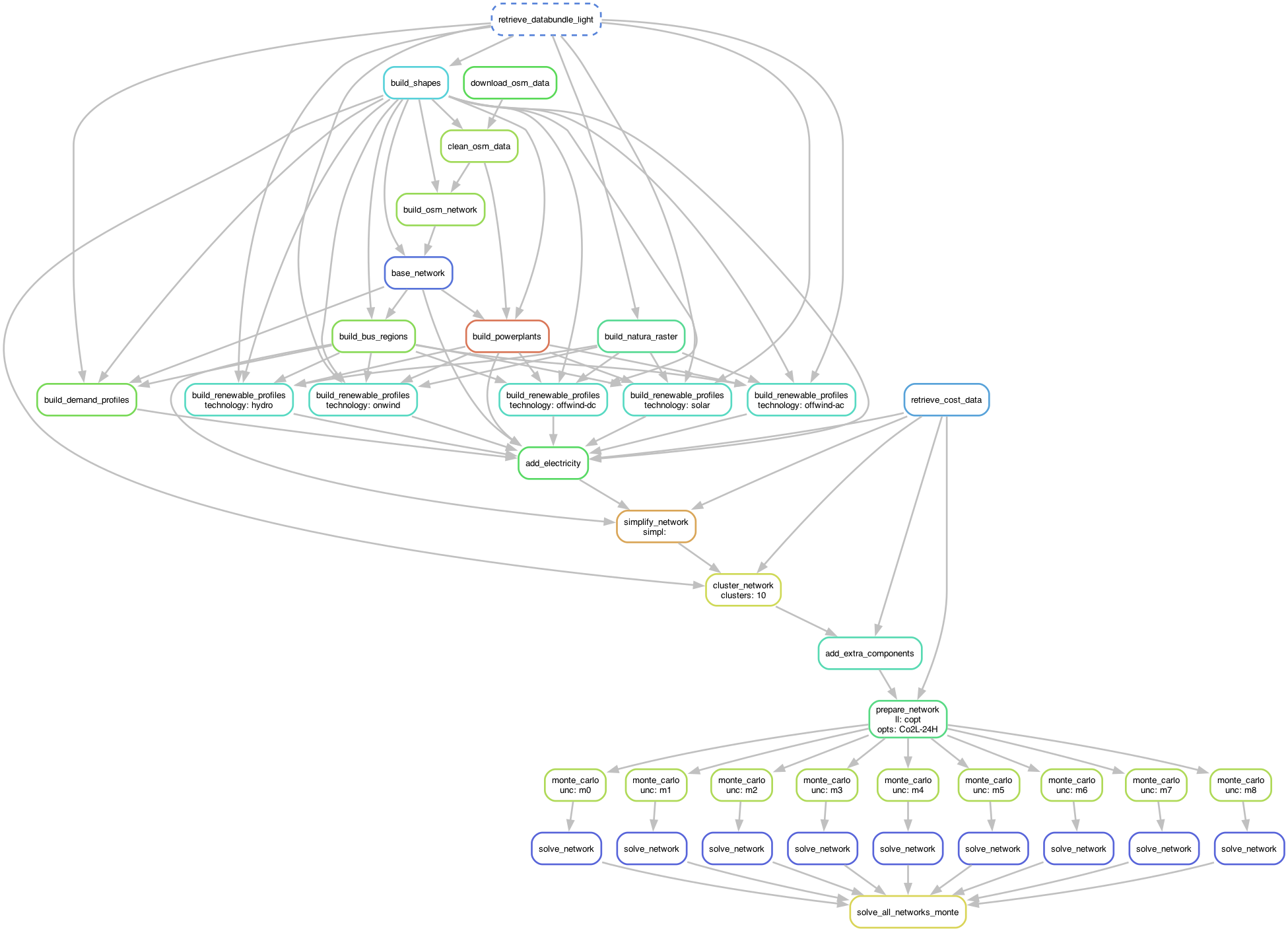
To create a DAG of the monte-carlo simulation workflow, use the following command:
.../pypsa-earth % snakemake -j 1 solve_all_networks_monte --dag | dot -Tpng > monte_carlo_workflow.png
The diagram below shows the Monte Carlo simulation workflow:
The monte-carlo simulation can be run using the following rule:
Tip: Increasing the number of cores can make the process run faster. The number of cores can be increased by setting the
-joption to the desired number of cores.
API Reference
See the Monte Carlo API Reference for detailed function documentation.