Tutorial: Building and Running the Sector-Coupled Model
Note
If you have not yet installed PyPSA-Earth, please refer to the installation section.
In this tutorial, we will show you how to run the sector-coupled model. The sector-coupled model is a model that considers the energy system as a whole, including the electricity, heat, transport, and industry sectors. The model has been insipred and partially based on the PyPSA-Eur model, which is a model of the European energy system. The sector-coupled model is a global model that can be used to model any region of the Earth. This section explains how to run and analyze the tutorial model.
The sector-coupling code can be run as an overnight/greenfield scenario or myopic scenario. The overnight scenario is a long-term scenario that runs for a year, while the myopic scenario is a short-term scenario that runs for a day.
Overnight Scenarios
Configuration
All the configuration for a sector-coupled run are present in the config.default.yaml file.
In particular, the default value for foresight parameter is set to overnight. For the purpose
of this tutorial, test/config.sector.yaml will be used in addition to config.default.yaml
to run the sector-coupled model. That allows to enable using a lightweight tutorial datakit
enabled with tutorial: true.
Documentation for all options is currently being updated in config.
Scenarios can be defined like for electricity-only studies, but with additional wildcard options.
It is important to set the following flags retrieve_databundle and retrieve_databundle_sector to false after the first run to prevent unnecessary re-downloads, as the files only need to be downloaded once.
scenario:
  simpl: [""]
  ll: ["copt"]
  clusters: [10]
  opts: [Co2L-3h]
  planning_horizons: # investment years for myopic and perfect; or costs year for overnight
  - 2030
  sopts:
  - "144h"
  demand:
  - "AB"
Note
For allowed wildcard values, refer to wildcards.
Execution
To run the tutorial for the sector-coupled model, you need to activate the pypsa-earth environment. You need to have installed PyPSA-Earth using the instructions provided in the installation section. Make sure to be in the PyPSA-Earth root directory and run the following command:
Tip
It is good practice to perform a dry-run using the option -n, before you commit to a run:
This covers the retrieval of additional raw data from online resources and preprocessing data about the transport, industry, and heating sectors as well as additional rules about geological storage and sequestration potentials, gas infrastructure, and biomass potentials. The workflow extracts all the data needed to run a model for any country of the world.
This triggers a workflow of multiple preceding jobs that depend on each rule's inputs and outputs:
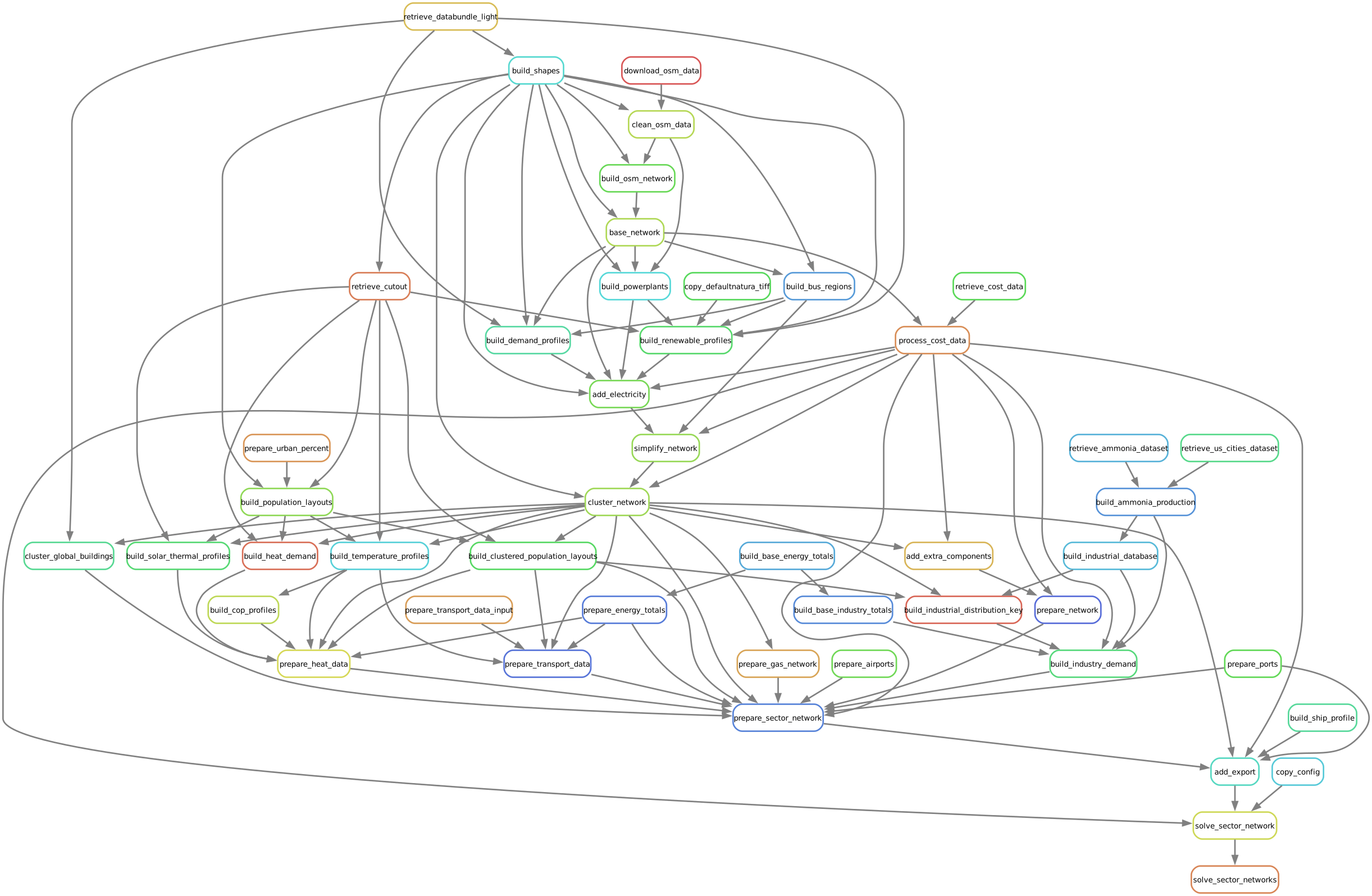
In the terminal, this will show up as a list of jobs to be run:
Building DAG of jobs...
Job stats:
job   count
----------------------------------  -------
add_electricity   1
add_export1
add_extra_components  1
base_network  1
build_base_energy_totals  1
build_base_industry_totals1
build_bus_regions 1
build_clustered_population_layouts1
build_cop_profiles1
build_demand_profiles 1
build_heat_demand 1
build_industrial_distribution_key 1
build_industry_demand 1
build_natura_raster   1
build_osm_network 1
build_population_layouts  1
build_powerplants 1
build_renewable_profiles  5
build_shapes  1
build_ship_profile1
build_solar_thermal_profiles  1
build_temperature_profiles1
clean_osm_data1
cluster_network   1
copy_config   1
download_osm_data 1
prepare_airports  1
prepare_energy_totals 1
prepare_gas_network   1
prepare_heat_data 1
prepare_network   1
prepare_ports 1
prepare_sector_network1
prepare_transport_data1
prepare_transport_data_input  1
prepare_urban_percent 1
retrieve_cost_data1
retrieve_databundle_light 1
simplify_network  1
solve_sector_network  1
solve_sector_networks 1
total45
Myopic Foresight Scenarios
Configuration
The configuration to run the tutorial for the myopic foresight scenario is present
in the test/config.myopic.yaml file.
Note
It is important to set the following flag retrieve_databundle and retrieve_databundle_sector to false after the first run to prevent unnecessary re-downloads, as the files only need to be downloaded once.
Scenarios can be defined like for electricity-only studies, but with additional wildcard options. For the myopic foresight mode, the {planning_horizons} wildcard defines the sequence of investment horizons.
Hint
The myopic optimisation is only possible on the sector-coupled model
scenario:
  simpl: [""]
  clusters: [4]
  planning_horizons: [2030] # investment years for myopic and perfect; or costs year for overnight
  ll: ["c1"]
  opts: ["Co2L-24H"]
  sopts: ["144h"]
  demand: ["DF"]
For allowed wildcard values, refer to [wildcards]. Documentation for all options will be added successively to [config].
Execution
To run the tutorial for the sector-coupled model with myopic foresight, you need to activate the pypsa-earth environment. You need to have installed PyPSA-Earth using the instructions provided in the [installation] section. Make sure to be in the PyPSA-Earth root directory and run the following command
Pro Tip
It is good practice to perform a dry-run using the option -n, before you commit to a run:
which will result in additional jobs snakemake wants to run, which translates to the following workflow diagram which nicely outlines how the sequential pathway optimisation with myopic foresight is implemented in the workflow:
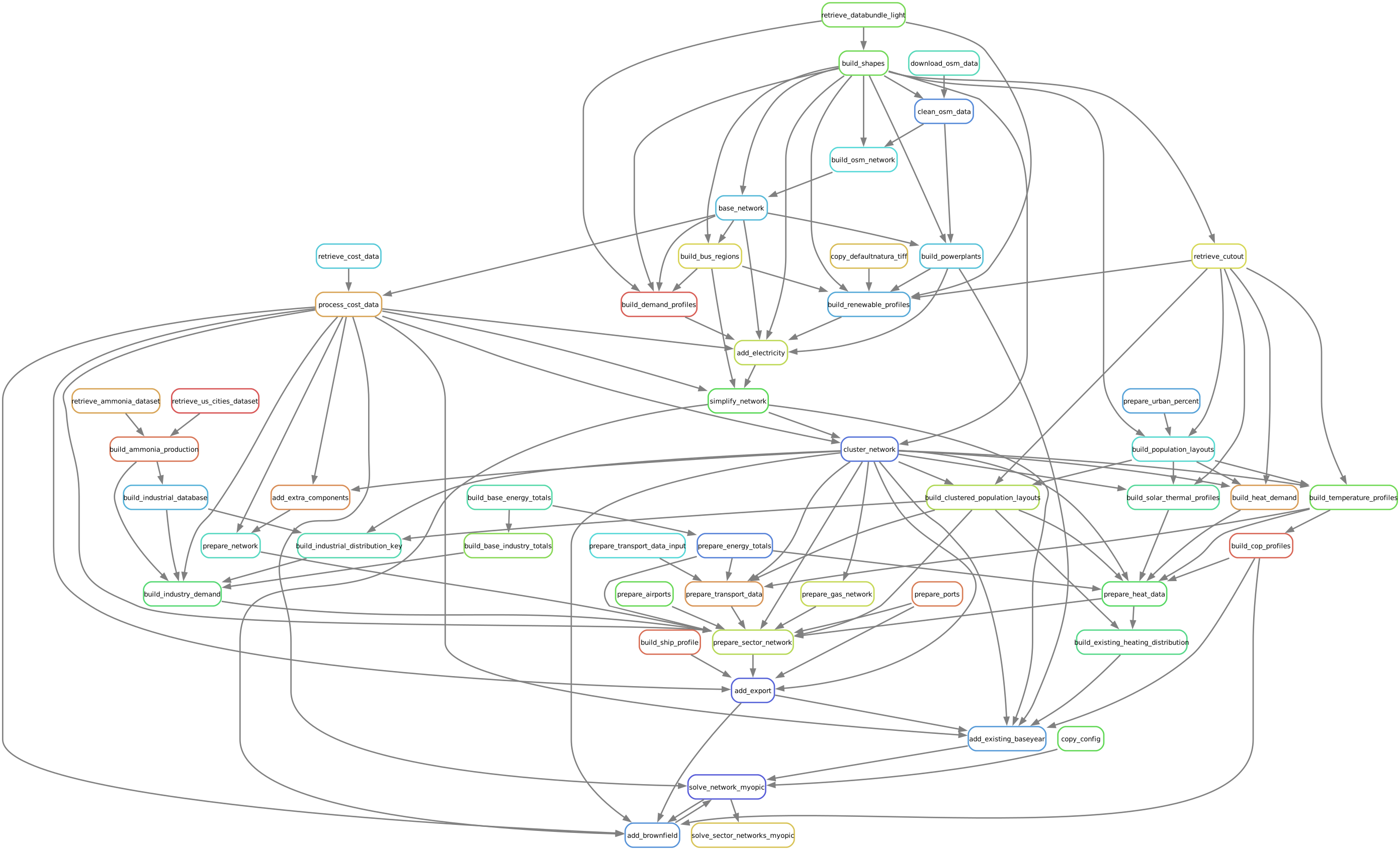
In the terminal, this will show up as a list of jobs to be run:
Building DAG of jobs...
Job stats:
jobcount
-----------------------------------  -------
add_electricity1
add_existing_baseyear  1
add_export 1
add_extra_components   1
base_network   1
build_base_energy_totals   1
build_base_industry_totals 1
build_bus_regions  1
build_clustered_population_layouts 1
build_cop_profiles 1
build_demand_profiles  1
build_existing_heating_distribution1
build_heat_demand  1
build_industrial_database  1
build_industrial_distribution_key  1
build_industry_demand  1
build_natura_raster1
build_osm_network  1
build_population_layouts   1
build_powerplants  1
build_renewable_profiles   5
build_shapes   1
build_ship_profile 1
build_solar_thermal_profiles   1
build_temperature_profiles 1
clean_osm_data 1
cluster_network1
copy_config1
download_osm_data  1
prepare_airports   1
prepare_energy_totals  1
prepare_gas_network1
prepare_heat_data  1
prepare_network1
prepare_ports  1
prepare_sector_network 1
prepare_transport_data 1
prepare_transport_data_input   1
prepare_urban_percent  1
retrieve_cost_data 1
retrieve_databundle_light  1
simplify_network   1
solve_all_networks_myopic  1
solve_network_myopic   1
total 48
Scaling-Up
If you now feel confident and want to tackle runs with larger temporal, technological and spatial scopes, you can adjust the configuration file to your needs. You can also check the model_customization for more information on how to customize the model.